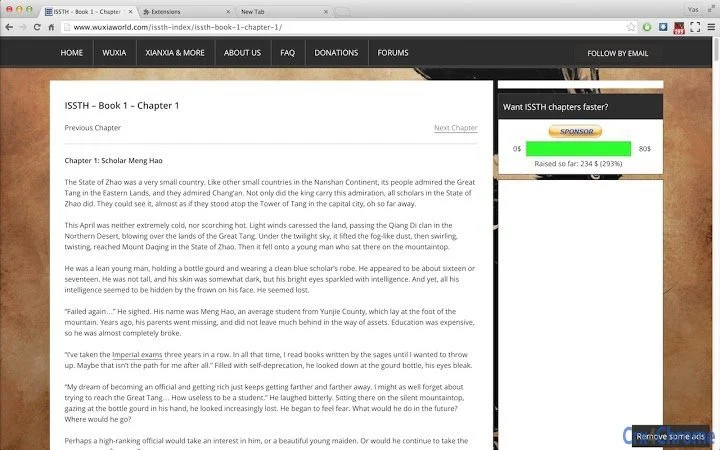

Fullscreen WordPress Reader for Seamless Browsing
Обзор
Программное обеспечение разработано для отображения страниц и записей WordPress в полноэкранном режиме, улучшая процесс чтения за счёт устранения отвлекающих факторов. Оно позволяет пользователям читать контент, не выходя из полноэкранного режима при переходе между страницами одного сайта, упрощая рабочий процесс для тех, кто часто потребляет длинные материалы. Инструмент особенно полезен для читателей, исследователей и кураторов контента, проводящих значительное время на сайтах, основанных на WordPress, таких как Baka‑Tsuki. Текущий статус разработки виден по частым обновлениям и включению функций, например записи истории навигации, что повышает непрерывность между сеансами. Разработчик Yascob09 предоставил прозрачный журнал обновлений, указывающий на активную разработку и отзывчивость к обратной связи пользователей. Хотя продукт ещё не считается официальным релизом, он уже поддерживает ключевые функции на платформах Windows и Mac. Примеры реального использования включают чтение переведённых глав манги, академических блог‑постов или подробной документации, размещённой на WordPress. Лёгкость инструмента и его узкоспециализированный фокус делают его идеальным для пользователей, ищущих среду чтения без отвлечений.
Ключевые функции и возможности
- Fullscreen Reading Mode: Activates full-screen display for WordPress content, removing browser UI elements to minimize distractions.
- Seamless Navigation: Maintains fullscreen state when switching between posts on the same site, eliminating the need to re-enter fullscreen.
- Navigation History: Records chapter and post navigation when not in incognito mode, restoring the correct page on reload.
- Scroll Position Memory: Preserves scroll position across sessions, though performance may vary on certain pages.
- Customization Options: Right-click the icon to access an options menu with overrides, including the ability to hide comments sections.
- Site Compatibility: Designed for WordPress sites, with partial support for Blogspot and tested functionality on Baka‑Tsuki.
- Update‑Driven Improvements: Regular updates address bugs and introduce new features, such as improved code logic and UI redesigns.
These features are particularly effective for users who read lengthy content across multiple pages. For example, a reader tracking a long manga series on Baka‑Tsuki can navigate chapters without leaving fullscreen, with the software remembering their last viewed position. The ability to disable lag‑prone features like scroll memory ensures usability even on performance‑sensitive pages. The inclusion of a dedicated options menu allows users to tailor the experience to their preferences, enhancing both comfort and efficiency.
Пользовательский интерфейс, рабочий процесс и производительность
The user interface is minimal and focused on functionality. A small icon in the top‑right corner of the browser window serves as the primary control point. Left‑clicking this icon activates fullscreen mode, while a right‑click opens a dropdown menu with access to customization options. The layout is straightforward, with no complex menus or layered navigation, which supports quick access and ease of use. Workflow efficiency is high for its intended purpose: once activated, the software integrates smoothly into the reading process. The developer did not specify resource usage details, but the 15.7 MB file size suggests a lightweight application. Performance observations are based on general software behavior patterns. Some users may notice a brief delay before the fullscreen button becomes active after page load, which is documented in the release notes. Stability may vary due to the software’s ongoing development, and occasional bugs are expected. However, the developer has demonstrated responsiveness to reported issues, which helps maintain usability.
Совместимость и системные требования
The software is compatible with Windows and Mac operating systems. The current version is 0.8.1, with a file size of 15.7 MB. Installation is straightforward, though specific system requirements were not listed. The developer did not provide additional system requirements beyond the supported platforms. Compatibility information is limited to the operating systems mentioned. Users should ensure their browser supports the underlying technology used by the software. The tool is designed to work with WordPress sites and has been tested on Baka‑Tsuki, indicating a level of site‑specific functionality. Support for other platforms or browsers was not specified. The software’s reliance on browser‑based rendering means it may be affected by browser updates or changes in website structures.
Плюсы и минусы
Плюсы
- Lightweight at just 15.7 MB
- Seamless navigation between posts on the same site
- Navigation history and scroll position memory
- Customizable options via intuitive dropdown menu
- Active development with regular updates
- Free to use with no licensing restrictions
Минусы
- Not yet considered an official release; may contain bugs
- Scroll memory can be laggy on certain pages
- Limited system requirement details
- Compatibility with non‑WordPress sites is unconfirmed
- Development is ongoing, so features may change or be removed
Раздел часто задаваемых вопросов
Совместимо ли это программное обеспечение со всеми сайтами WordPress?
The software is designed for WordPress sites and has been tested on Baka‑Tsuki. Compatibility with other sites may vary, especially if their structure differs significantly. Users are encouraged to report issues with specific sites.
Можно ли использовать этот инструмент офлайн?
Yes, the software functions offline after initial setup. However, features like navigation history rely on browser storage and may not work if the site is not cached or accessible.
Безопасно ли использовать это программное обеспечение?
The software is free and open to feedback, with the developer actively addressing issues. It does not collect user data beyond what is necessary for functionality. Users should only install it from trusted sources.
Как часто выпускаются обновления?
Updates are released regularly, with the latest version being 0.8.1. The developer maintains a transparent update log and responds to user feedback, indicating frequent development cycles.
Что делать, если я столкнулся с ошибкой?
If you encounter a bug, first check the updated features list. If the issue persists, report it via the developer’s email at [email protected]. The developer welcomes feedback and will explain decisions on feature requests.
Заключительные мысли + Призыв к действию
This fullscreen reading tool offers a focused, distraction‑free experience for users of WordPress‑based content. While still under development, it delivers strong core functionality with thoughtful features like navigation history and scroll memory. Its lightweight design and free availability make it accessible to a wide audience. The active development and responsiveness to user feedback are significant advantages. Although occasional bugs and performance hiccups may occur, the benefits outweigh the limitations for dedicated readers. The software is ideal for anyone who spends time reading long‑form content on WordPress or similar platforms. For those seeking a streamlined, immersive reading experience, this tool is a promising choice. Download Fullscreen WordPress Reader for Seamless Browsing now.







